



![How To Create A Chatbot Without Coding [2026 Tutorial]](/images/6995bfb8e3e1359ecf9c4e4d_665f4b58664a74547a4d95d2_Chatbot-20Basics.webp)
Building a chatbot used to be a task reserved for engineers fluent in code and complex logic systems. Not anymore. Today, anyone—from marketers to customer experience teams—can learn how to build a chatbot that delivers real value, fast. But where most tutorials focus on theory or abstract frameworks, we’re going hands-on. In this guide, we’ll show you exactly how to build a chatbot using Voiceflow—no guesswork, no fluff. You’ll design real conversational flows, leverage powerful tools like the Agent block, and walk away with a production-ready bot built for real-world interactions.
Whether you’re solving for customer support, internal automation, or just experimenting with AI, this guide is your practical starting point.
The Fundamental Concepts Behind Chatbot Development
Before diving into the canvas and connecting flows, it’s worth understanding what’s actually powering your chatbot under the hood. The best bots do more than spit out pre-written answers—they understand intent, make decisions, and take action autonomously. This capability is built on three core pillars: Natural Language Processing (NLP), machine learning, and automation logic.
Natural Language Processing (NLP)
NLP is the layer that helps your chatbot interpret what a user is saying, even if it's phrased in a dozen different ways. It breaks down language into understandable components—detecting intents (what the user wants) and entities (the specifics within that intent, like dates, products, or locations).
For example, “I need to reset my password” and “Help me log in” mean different things on the surface, but an NLP engine can connect both to the same intent: account recovery.
Machine Learning, Action, and Automation
Once your bot understands what a user is asking, the next step is figuring out what to do about it.
That’s where machine learning and automation come in. Machine learning helps refine your chatbot’s accuracy over time, learning from data and user interactions. But more importantly, bots today can be hooked into APIs, databases, and business logic to actually perform actions.
Together, these tools allow your chatbot to go beyond answering FAQs. You can build bots that book meetings, escalate tickets, track orders, or qualify leads—all from a single conversation.
See what an AI customer support agent can handle in production.
Step-by-Step Guide to Create a Chatbot in Voiceflow
Creating a chatbot isn’t just about wiring together blocks—it’s about solving a specific problem for your users. That’s why the first step doesn’t involve tools or tech at all. It starts with clarity.
In this guide, we’ll be building your first chatbot using Voiceflow, the enterprise platform for designing, testing, and deploying production AI agents for customer support. You can build the full agent visually, and developers can extend it with APIs, functions, and custom code when the use case calls for it. Why Voiceflow? Because it strikes the perfect balance between simplicity and power: visual flow building, natural language understanding, multi-channel deployment, and real-time testing—all in one tool.
1. Define Your Chatbot’s Purpose
Before jumping into the tool, take a moment to define why you’re building this bot.
Ask yourself:
- Who will use this chatbot?
- What problems will it solve?
- What’s the key outcome—reducing support tickets? Increasing lead conversion?
Whether you’re creating a digital barista, customer support assistant, or internal helpdesk tool, having clear goals ensures your bot actually delivers value.
Also, depending on your use case or what you'd like to build, Voiceflow offers templates to help give you a headstart with a pre-built chatbot ready for you to edit and configure for your needs.
2. Sign Up and Set Up Your Project
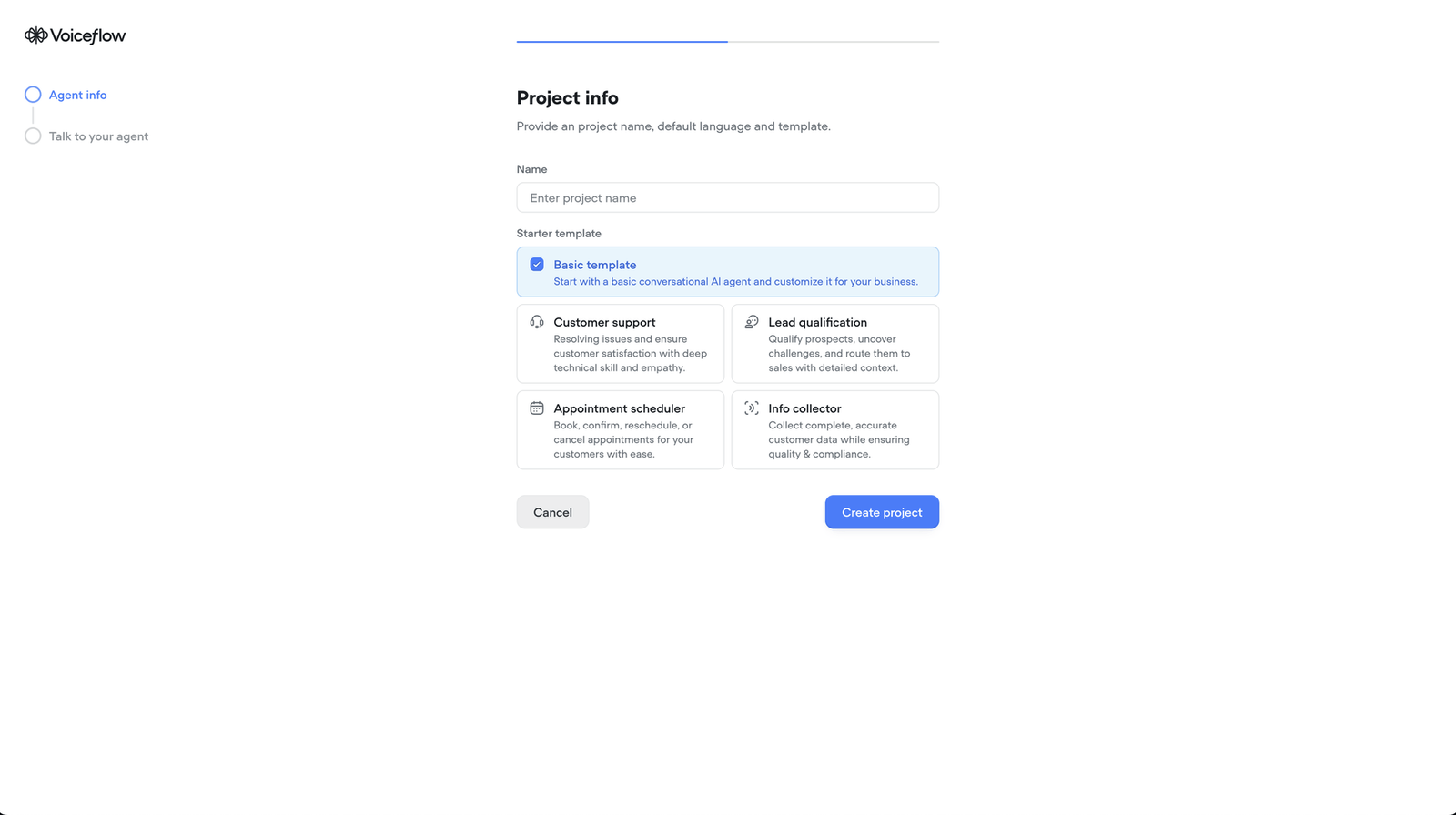
Getting started in Voiceflow is fast:
- Go to voiceflow.com
- Create a free account (no credit card required).
- Once logged in, click “New Agent” to start your first project.
- Name your assistant (e.g., CoffeeBot) and select a default language. Start with the Basic template for now.
- Click “Create Project”.
You’ll be dropped into Voiceflow’s visual canvas, where you build and test your agent.
3. Add a Welcome Message
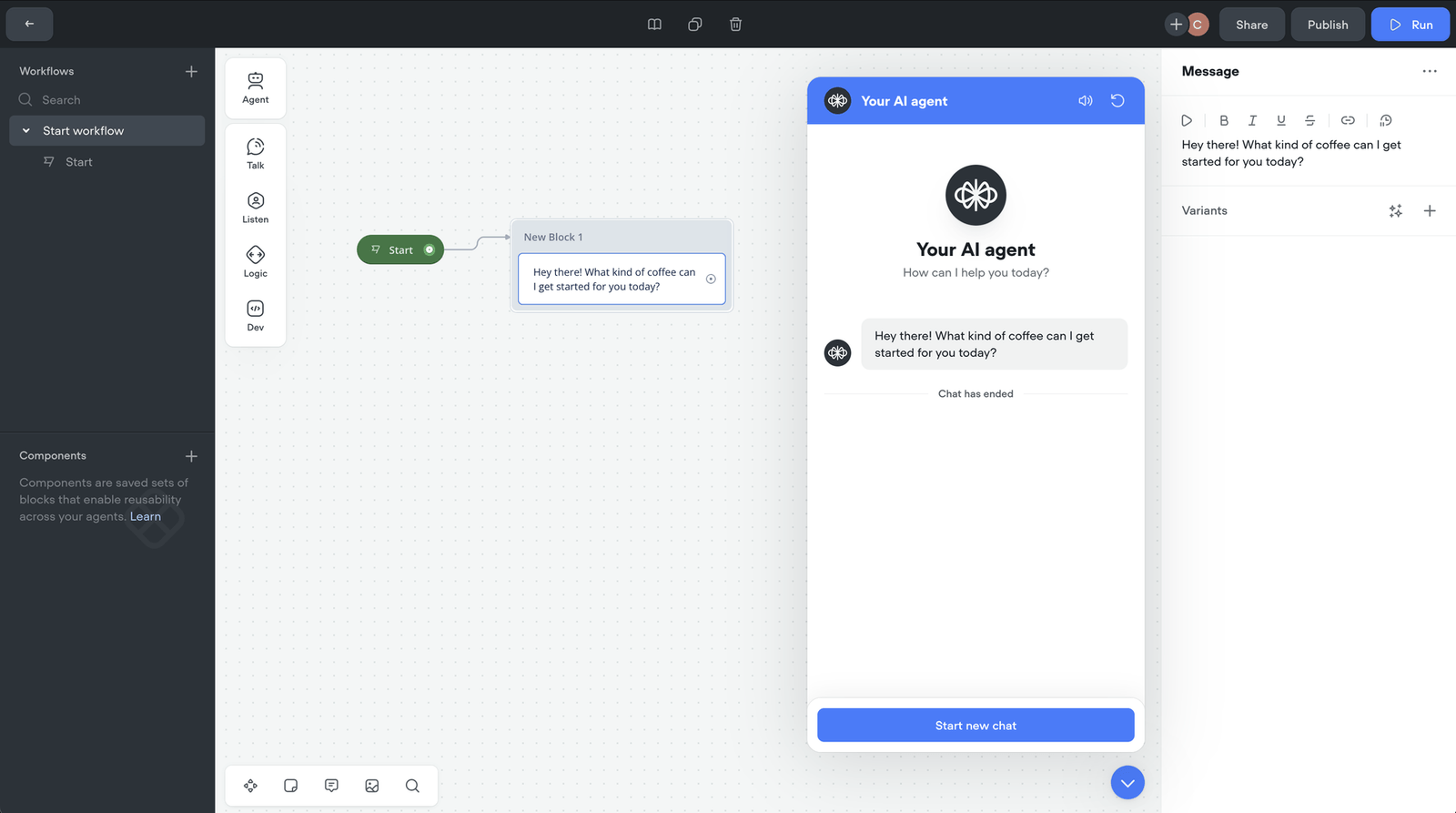
Every good chatbot starts with a warm hello.
- From the “Talk” section of the blocks panel, drag a Message block onto the canvas.
- Enter your welcome message, like: “Hey there! What kind of coffee can I get started for you today?”
This sets the tone for your interaction.
4. Add Choices with Buttons
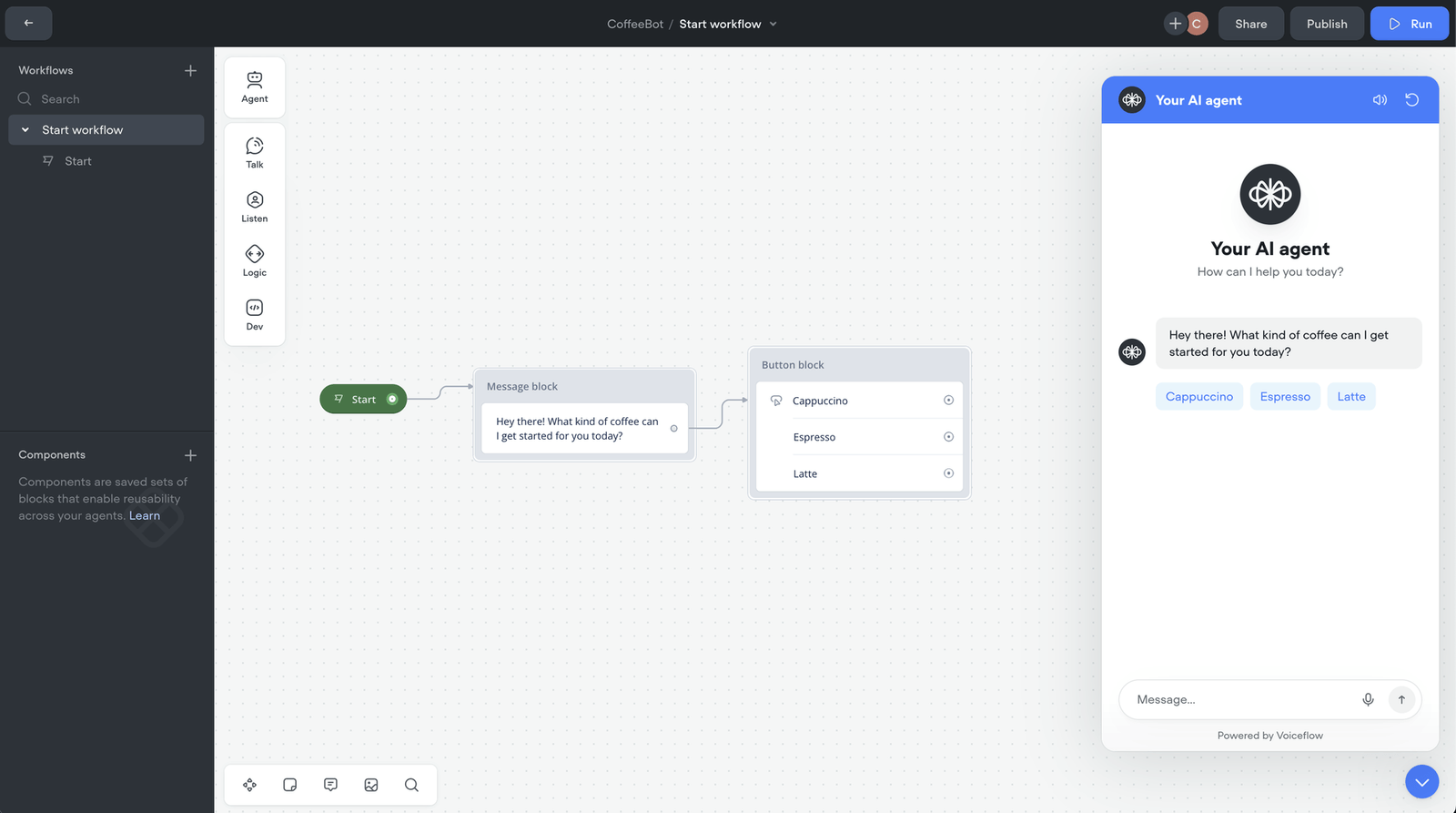
To give users simple, tappable options:
- Go to the “Listen” section and drag a Button block onto the canvas.
- Use the + icon inside the block to add options like:
- “Cappuccino”
- “Espresso”
- “Latte”
- Connect the Speak block to the Button block to define the conversation flow.
Now your bot can offer choices and branch based on user selection.
5. (Optional) Capture User Input
Want to personalize the experience?
- Drag a Capture block (from the “Listen” section) onto the canvas.
- Use it to collect a user’s name or order preference.
- Set a variable like
name, then reuse it in a new Speak block: - “Thanks, {name}. Your coffee will be ready shortly.”
Personalization = engagement.
6. (Optional) Add Conditional Logic
Need to react differently to specific inputs?
- Use a Conditional block from the Logic section.
- For example, if a user selects “Espresso”, show a block that says:
- “Great choice! You get a 10% discount today.”
Logic lets your chatbot feel dynamic and responsive.
7. (Optional) Integrate with APIs
Want to connect to real-time data?
- Use the API block under the Developer section.
- Enter your endpoint URL, then map response variables (like product availability, weather, or pricing).
- Use these variables in your messages, just like user inputs.
Voiceflow makes it easy to turn a static bot into a live, data-powered assistant.
8. Test and Iterate
Before you go live:
- Click “Run” to test your chatbot in the console or browser preview.
- Interact with your bot just like a user would.
- Adjust messages, flows, and logic based on what works (and what doesn’t).
Iteration is key to a great experience.
9. Publish and Deploy
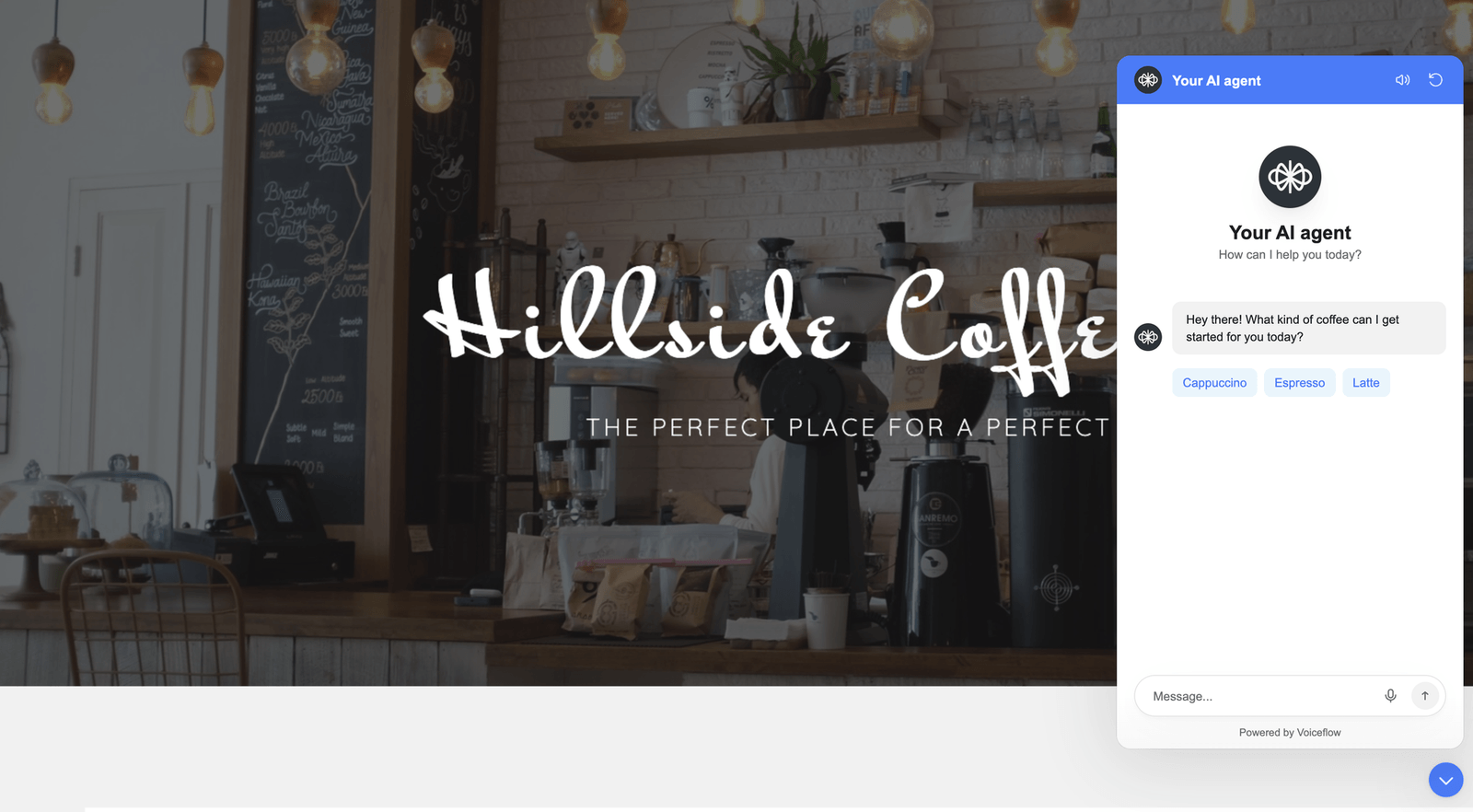
Happy with your bot?
- Click “Publish” in the top-right corner to go live.
- You’ll have the option to “Add Agent to Your Website”—perfect for embedding on your homepage or help center.
With just a few clicks, your chatbot is ready for the world.
Voiceflow’s Building Blocks, at a Glance
- Talk → What the bot says (Speak, Message)
- Listen → How users respond (Buttons, Capture)
- Logic → Conditional flows, variables
- Developer → APIs, advanced integrations
By combining these blocks, you can build everything from simple assistants to complex AI agents—without writing a line of code.
AI Chatbot Example Builds
Looking to take your chatbot creation to the next level? Voiceflow offers a variety of chatbot templates that let you build a custom AI chatbot quickly. Whether you're starting with a basic chatbot or aiming to build a chatbot from scratch with advanced features, these example builds provide a ready-made foundation that you can adapt to your specific needs.
Explore these chatbot example templates to see how different designs can improve user experience and enhance your chatbot's performance:
- Complete support chatbot template Perfect for organizations that need efficient customer service. This template is designed to handle complex support queries, ensuring smooth chat history management and consistent chatbot responses. Check out the Complete Support Chatbot Template
- Complete retail chatbot template Tailored for retailers, this template helps you engage with customers effectively and drive sales. It’s ideal if you want to create a custom solution that guides users through product inquiries and provides personalized recommendations. Explore the Complete Retail Chatbot Template
- Advanced AI FAQ support bot powered by your own documentation Harness the power of LLMs and ChatGPT with this template, designed to deliver detailed answers based on your documentation. Use this setup to train your chatbot on specific content, ensuring accurate and context-aware responses while seamlessly integrating your OpenAI API key. View the Advanced AI FAQ Support Bot Template
- Ecommerce Product Recommendation Chatbot This template is crafted for online stores looking to boost conversions by offering personalized product suggestions. It’s a great starting point for both beginners and experienced developers interested in chatbot creation, helping you craft a solution that evolves with real-time data and customer behavior. Discover the Ecommerce Product Recommendation Chatbot Template
Using these templates, you can easily experiment and iterate on your designs to train your chatbot, refine chatbot responses, and ultimately improve the overall performance and user experience of your conversational assistant. Whether you’re looking to deploy a basic chatbot or integrate advanced features like ChatGPT, these resources empower you to focus on what matters most—solving your users' needs with effective and responsive chatbots.
Build a Chatbot Now
From automating support to elevating customer engagement, the potential of an AI chatbot is no longer limited to tech giants. Thanks to platforms like Voiceflow, support and product teams can create production chatbots with a visual workflow builder, powerful logic, and real-time integrations, and developers can extend them with APIs and custom code.
Whether you’re looking to handle every query with precision, customize the experience to reflect your brand voice, or simply experiment with how far you can build your chatbot to go, Voiceflow gives you the canvas and capability to do it all. And as conversational AI continues to evolve—driven by large language models like ChatGPT—the bar for what a great chatbot can do keeps rising.
The good news? With the right goals and tools, you're more than ready to meet it.
Ready to get started? Sign up to Voiceflow and launch your first assistant today.
![Top 3 Open-Source Chatbots In 2026 [Tried & Tested]](/images/6995bfb8e3e1359ecf9c4e53_665f773cc809d49634d8743d_Chatbot-20Basics.webp)
![How to Build an AI Chatbot for Subscription Box Services [2026]](/images/6a43d0522814b0f024bca132_6a43d0525445be6f66902cf1_subscription-box-chatbot-hero.webp)