

More than 100,000 businesses run customer service on Zendesk, and its chatbot is part of that package. Uber, Instacart, and Zoom are on the list. If you're weighing Zendesk's chatbot for your own support team, the brand name does a lot of work, but "well-known" and "right for you" aren't the same thing.
So here's the honest version: what a Zendesk chatbot actually is in 2026, what it really costs once you add AI, how to set one up, and the alternatives worth comparing before you commit.
What Is a Zendesk Chatbot?
A Zendesk chatbot is automated support that lives on your website and inside your messaging channels. It resolves common questions without pulling in a human agent. You won't find it sold on its own. It comes bundled into Zendesk's Suite plans, and the modern, generative version is what Zendesk now markets as its AI agents rather than the older "Answer Bot" branding.
That rename matters for budgeting, because the basic bot and the AI agent are priced very differently. More on that next.
How Much Does a Zendesk Chatbot Cost?
The chatbot itself rides along with a Zendesk Suite subscription. Here's the current Suite pricing, billed per agent per month on an annual contract:
Plan
Per agent / month (annual)
Per agent / month (monthly)
Suite Team
$55
$69
Suite Growth
$89
$115
Suite Professional
$115
$149
Suite Enterprise
Custom (quote)
Custom (quote)
Zendesk also runs a "Zendesk for Startups" program with a free six-month membership for eligible early-stage companies.
The number that catches most teams off guard isn't the seat price. It's the AI. In 2026 Zendesk prices its AI agents on outcome-based pricing: you pay per automated resolution, not per seat. Mid-market deals land somewhere around $1 to $2 per resolution, with volume discounts at the enterprise level. That fee stacks on top of your Suite plan, so a busy support queue can run up a meaningful AI bill on top of the seats you already bought. If you want to understand why "resolution" is the number to watch (and how it differs from a softer "deflection" claim), our piece on what ticket deflection rate actually means breaks it down.
There are add-ons too. Copilot, the agent-assist feature, is its own line item at roughly $50 per agent per month. So the real monthly cost is rarely just the headline seat price. It's seats, plus Copilot, plus per-resolution AI fees, plus whatever else you bolt on. If you're sizing the full bill, our Zendesk pricing breakdown walks through the stacked math.
If predictable budgeting matters to you, that per-resolution model is worth modeling carefully against your real ticket volume before you sign.
Related: how enterprise teams run AI customer support automation with Voiceflow.
How Do Zendesk Chatbots Work?
Under the hood, Zendesk's bot reads a customer message, works out what they want, and either answers from your help center or takes an action like opening a ticket or resetting a password. The older bots leaned on natural language processing to match intents. The newer AI agents use large language models to handle messier, off-script questions and to generate AI responses instead of returning only pre-written replies.
The appeal is the tight integration with the rest of Zendesk. The bot already knows your help center, your ticketing system, and your product catalog, so there's less setup to teach it your business. It also runs across channels, so the same automation can answer on your site, on Facebook, on WhatsApp, and over messaging.
How Do You Set Up a Chatbot in Zendesk?
The chatbot isn't switched on by default. You build it in the Admin Center. The flow looks like this:
- Log into your Zendesk account and open the Admin Center.
- Go to Channels, then AI agents and automations (formerly "Bots and automations").
- Choose to create a new AI agent.
- Name it, and set branding or a custom avatar if you want one.
- Pick the language it should speak.
- Turn on the generative AI features.
- Create the agent, then write and refine its answers before publishing.
Your agent starts in draft mode. Historically Zendesk's visual builder capped a single bot at several hundred answers and a couple thousand steps, so very complex flows can hit ceilings. Test the build with a few teammates before you publish. Every reply should sound natural and on-brand, not robotic.
Building on a specific channel? See our guide to building a WhatsApp chatbot with Zendesk.
What Are the Best Zendesk Chatbot Alternatives?
The title promised alternatives, so here they are. Zendesk is a strong incumbent, but depending on what you're optimizing for, it may not be the best fit:
- Voiceflow: a platform for designing, testing, and shipping chat and voice agents with model choice and transparent usage-based pricing. The head-to-head is below.
- Intercom: its Fin AI agent also prices per resolution and is the most direct comparison to Zendesk's outcome-based model.
- Sierra: an enterprise CX agent platform aimed at large support orgs.
- Decagon: a newer generative-AI support platform competing on autonomous resolution.
- Cognigy: strong in voice and contact-center automation, now part of NICE.
- Ada: a quote-based, automation-first CX platform built around its Automated Resolution metric.
For the wider field, see our roundups of the best AI chatbots and the customer service automation landscape, plus our list of the best AI chatbots that integrate with Zendesk and the strongest Zendesk alternatives for 2026.
Voiceflow vs. Zendesk for AI Support Agents
Both platforms automate customer service. The real difference is how much you own: the model, the agent's logic, and the visibility into what it does once it's live.
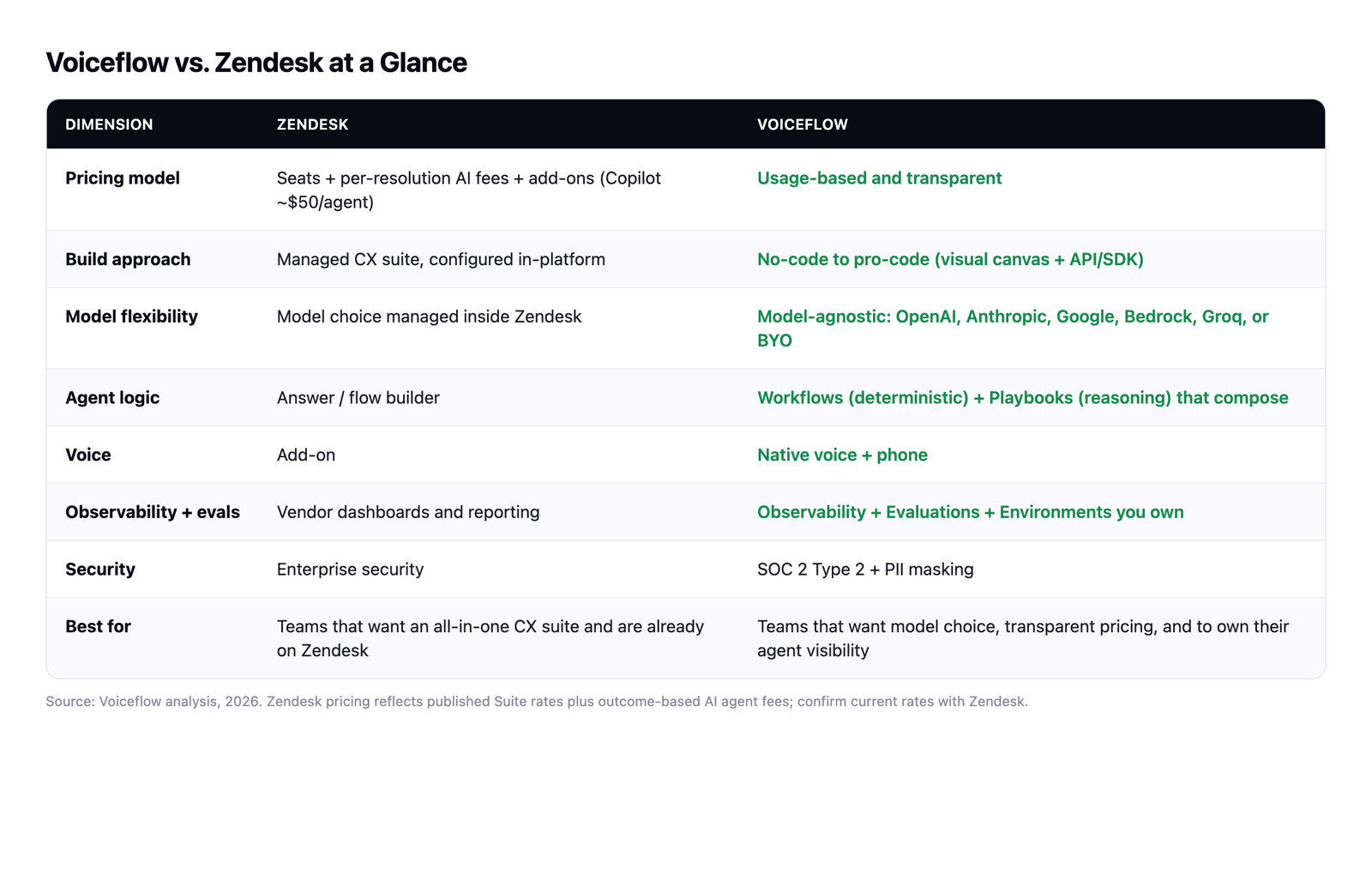
Which models you run. Zendesk manages model choice inside its platform. Voiceflow is model-agnostic by design, so you can run OpenAI, Anthropic, Google, Bedrock, or Groq per agent. If avoiding model lock-in matters, it's built in.
How the agent behaves. Voiceflow splits agent logic into two primitives that compose. Workflows are deterministic SOPs for the things that have to go right every time, like refunds or identity checks. Playbooks give the agent a goal and room to reason. A workflow can hand to a playbook mid-conversation and back again, so the agent stays adaptable without going off-script.
What you can see. This is the part buyers underrate. Voiceflow includes a Knowledge Base, Evaluations, and an observability suite, so you can trace every conversation, define what "good" looks like, and test changes in staging before they ship. You own that visibility instead of reading it off a vendor dashboard. It's SOC 2 Type 2 compliant with PII masking.
What it costs. Zendesk is seats plus per-resolution AI fees plus add-ons. Voiceflow is usage-based and transparent, so you aren't paying a per-resolution toll on every conversation.
You also don't have to choose one or the other. Voiceflow has a native Zendesk integration, so you can layer a Voiceflow agent on top of the Zendesk stack you already run: automate Zendesk tickets, recommend help-center articles, and hand off to a human when it matters. For the bigger picture on building support automation that scales, our guide to the AI customer service agent is a good next read.
The honest version: if you want a managed, all-in-one CX suite and you're already invested in Zendesk, its chatbot is a credible choice. If you want model choice, transparent pricing, and to own the visibility into your own agents, that's where Voiceflow fits. Voiceflow's customers include Turo, StubHub International, Sanlam Studios, and Trilogy. To see how it handles your use case, book a demo.

